How to answer Claude Code's permission prompts without the terminal
Claude Code asks before it runs a command or edits a file, and it waits in a terminal you may not be looking at. You come back ten minutes later to "Do you want to proceed?". There are three ways around that: fewer prompts, your own hook, or answering from the notch. I built the third one into Halo, so here's how the hook underneath works, with the real details.
Option 1: get fewer prompts with permission rules
Claude Code only asks when no rule covers the action. Rules live under permissions in .claude/settings.local.json (just you, this project), .claude/settings.json (everyone on the project) or ~/.claude/settings.json (every project):
{
  "permissions": {
    "allow": ["Bash(npm test:*)", "Bash(git status)"],
    "deny": ["Bash(rm -rf:*)"]
  }
}
Choosing Yes, and don't ask again in the terminal writes one of these rules for you. Keep them narrow: Bash(npm test:*) allows one command with any arguments, a bare Bash allows every command.
Option 2: answer with your own PermissionRequest hook
Claude Code runs a PermissionRequest hook each time it's about to ask. The hook gets the request as JSON on stdin (the tool, its input, the folder, and Claude's suggested rule in permission_suggestions), and whatever it prints back decides:
{"hookSpecificOutput": {"hookEventName": "PermissionRequest",
"decision": {"behavior": "allow"}}}- Allow:
"behavior": "allow". - Deny:
"behavior": "deny"with a"message", which Claude reads, so it can try something else. - Always: allow, plus
"updatedPermissions"set to thepermission_suggestionsClaude sent. That's the same rule the terminal's "don't ask again" would save, no wider. - Questions (Claude's AskUserQuestion) come through the same hook: allow, with
"updatedInput"holding the original input plus ananswersmap. Plans (ExitPlanMode) are approved by echoing the plan back inupdatedInput. - Print nothing and exit 0, and Claude Code asks you itself as usual.
Register it in ~/.claude/settings.json. A hook that waits for a person needs a long timeout, in seconds:
{"hooks": {"PermissionRequest": [{"hooks": [
  {"type": "command", "command": "bash ~/ask.sh", "timeout": 3600}
]}]}}
Two details make this pleasant rather than scary. Claude Code keeps its own prompt on screen while the hook runs, so you can still answer in the terminal. And if your hook gives up or prints nothing, nothing breaks: the normal prompt decides.
Option 3: answer from the notch with Halo
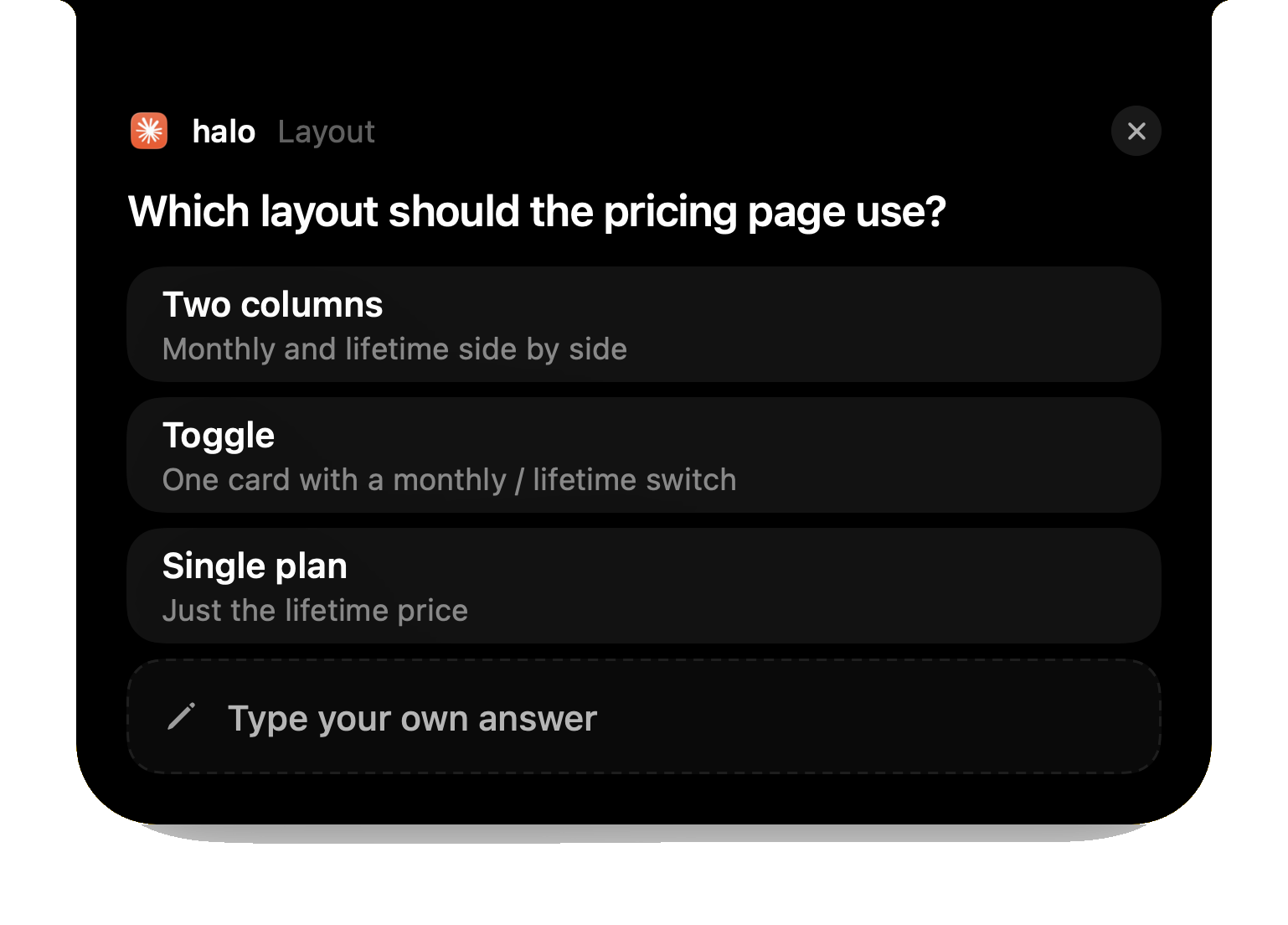
Halo does Option 2 for you. When Claude Code, Codex or OpenCode needs you, the request drops out of your Mac's notch: Deny, Always or Allow for a permission, the options for a question, Approve for a plan. Write and Edit requests show the change itself, removed lines in red and added in green. Several waiting at once queue up, oldest first, with a +N count.
Underneath is one bash script of about 40 lines, registered as the PermissionRequest hook. It appends the request to a file in ~/Library/Application Support/Halo and checks every 0.2 seconds for your answer, then prints it as the JSON above. It makes no network calls and always exits 0. If Halo isn't running or quits, or the session dies while it waits, it prints nothing and Claude Code's own prompt takes over. Answer in the terminal instead and the card closes by itself. You can read the script there after turning the feature on.
Codex works differently: it shows its prompt only after the hooks decide, so Halo waits 20 seconds and then hands the question back to the terminal. OpenCode gets the same answers through a small plugin. It all works in Terminal, iTerm2, Ghostty, tmux and the terminals inside VS Code, Cursor and Windsurf, but only for agents running on this Mac, not over SSH.
Which one to pick
- The same few commands every time: Option 1. Narrow rules, and the prompts stop.
- You want your own logic, say auto-allow reads and ask about the rest: Option 2.
- You switch apps while agents work: Option 3, so the question comes to where you are.
Questions
Can I approve Claude Code permissions outside the terminal?
Yes. Claude Code runs a PermissionRequest hook before it asks, and the JSON the hook prints back (allow or deny) answers the request. Halo uses that hook to put the question in your Mac's notch.
What does Always save in Claude Code?
A permission rule such as Bash(npm test:*), written to your settings so Claude Code stops asking for that action. From a hook, Always means echoing Claude's own permission_suggestions back as updatedPermissions, the same rule the terminal would save.
What happens if the hook doesn't answer?
If the hook prints nothing and exits 0, Claude Code shows its normal prompt and you answer in the terminal. Halo's hook does exactly that when Halo isn't running or the session goes away.
Does answering from the notch work in tmux or VS Code?
Yes. The hook runs inside Claude Code wherever it runs on your Mac: Terminal, iTerm2, Ghostty, tmux, or the terminals in VS Code, Cursor and Windsurf. Sessions on another machine over SSH aren't covered.
Does Halo send my prompts anywhere?
No. The hook and Halo talk through files on your Mac, and the hook makes no network calls.
More guides: Know when Claude Code is done · Know when Codex is done · All guides
Try Halo
Answer Claude Code, Codex and OpenCode from your notch, plus notifications, dictation and music. $9.99 one-time, no subscription.
Buy Halo