How to get a Now Playing widget on your Mac
Your iPhone shows what's playing on the lock screen and in the Dynamic Island. Your Mac has Now Playing controls too, but they're tucked inside Control Center. Here's how to bring them out, and how to see the song, artwork and lyrics in the notch for Spotify, Apple Music or a browser tab.
What macOS gives you
macOS already tracks what's playing in any app that reports it: Apple Music, Spotify, Podcasts, QuickTime, and a video in Safari or Chrome. You can see it in two places:
- Control Center: click the Control Center icon in the menu bar. The Now Playing tile shows the song, the app and play/pause. Click it for artwork, a scrubber and skip buttons.
- The lock screen: when music plays while your Mac is locked, macOS shows the song and play controls there.
Option 1: keep Now Playing in the menu bar
So you don't have to open Control Center every time:
- Open System Settings › Control Center.
- Find Now Playing and set it to Show in Menu Bar (Always or When Active, depending on your macOS version).
- A small play icon appears in the menu bar. Click it for the song, artwork and controls.
Where it falls short: it's an icon. You still click to see what's playing, there are no lyrics, and on a MacBook with a notch a crowded menu bar can push it out of sight behind the notch.
Option 2: Now Playing in the notch, with Halo
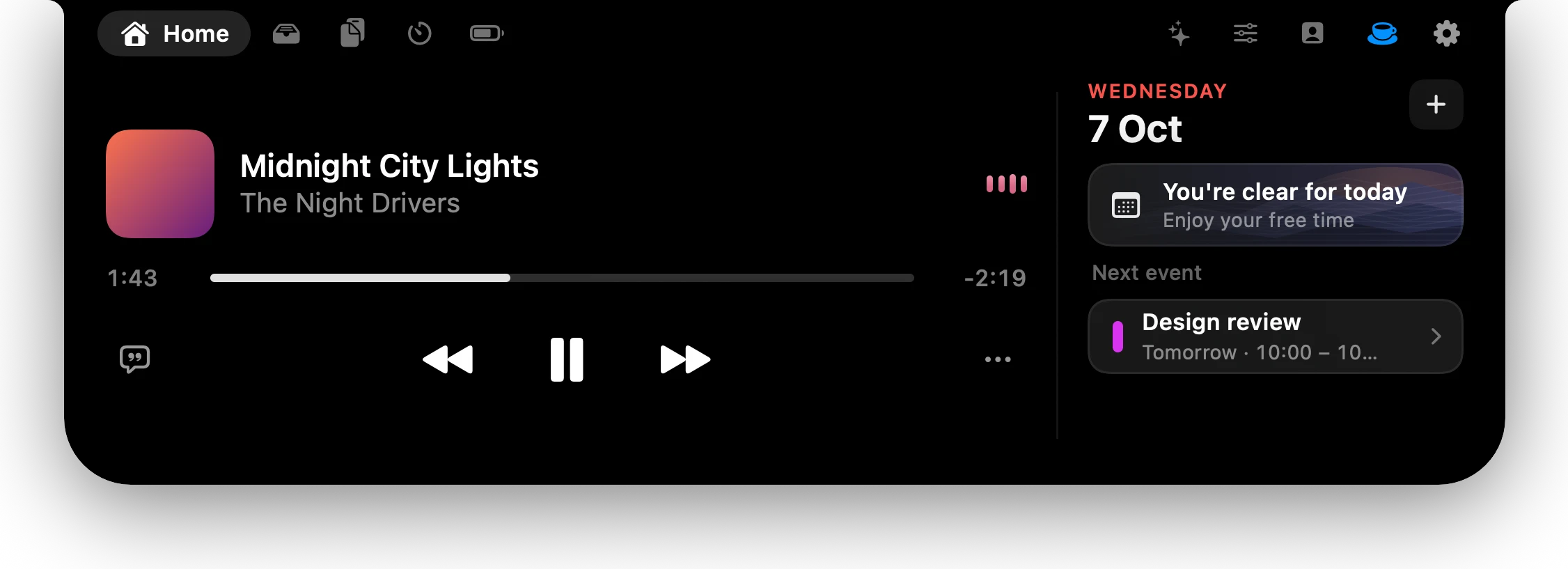
Halo is a Dynamic Island for the Mac. When something plays, the closed island shows the album artwork on one side of the notch and a visualizer that follows the music on the other, so you can see what's playing without clicking anything. Hover to open it: artwork, the song and artist, a scrubber you can drag, play, pause and skip, plus shuffle and repeat when the app has them.
- Open Halo's Settings and go to Music.
- Turn on Now Playing.
- Optional: turn on Lyrics for synced lyrics a click away, and Show music on the lock screen (beta) for bigger controls while your Mac is locked.
It works with any app that reports to macOS, including Spotify, Apple Music and YouTube in a browser. For browser videos, Halo splits a title like "Artist - Song (Official Video)" into the song and the artist, the way a music app shows it. Lyrics come from LRCLIB, which gets only the title and the artist. Turn Lyrics off and Halo never asks.
No notch? On an external monitor or an older Mac, Halo draws a slim island at the top of the screen and Now Playing works the same way.
Which one to pick
- You only skip a song now and then: Option 1. It's free and already on your Mac.
- You want to see what's playing at a glance, with lyrics, without clicking: Option 2.
Questions
Does macOS have a Now Playing widget?
Yes, inside Control Center. You can also add Now Playing to the menu bar in System Settings › Control Center, so it's one click away. It doesn't show anything until you click it.
Does Now Playing work with Spotify?
Yes. Spotify reports what it's playing to macOS, so it appears in Control Center's Now Playing and in Halo's island, with artwork and controls.
Can I see YouTube in Now Playing?
Yes. A video playing in Safari or Chrome reports to macOS like a music app. Halo also splits a video title like "Artist - Song (Official Video)" into the song and the artist.
Can my Mac show lyrics for the song that's playing?
Apple Music can show lyrics inside its own window. Halo shows synced lyrics for whatever is playing, Spotify included, from LRCLIB. It sends only the title and artist, and you can turn it off.
Do I need a MacBook with a notch?
No. On an external monitor or a Mac without a notch, Halo draws its island at the top of the screen and shows Now Playing there.
More guides: Show notifications in the MacBook notch · Dictate into any app on a Mac · All guides
Try Halo
Now Playing, lyrics and notifications in the notch, on any Mac. $9.99 one-time, no subscription.
Buy Halo