boring.notch for Mac: is it safe, does it drain the battery, and how to install it
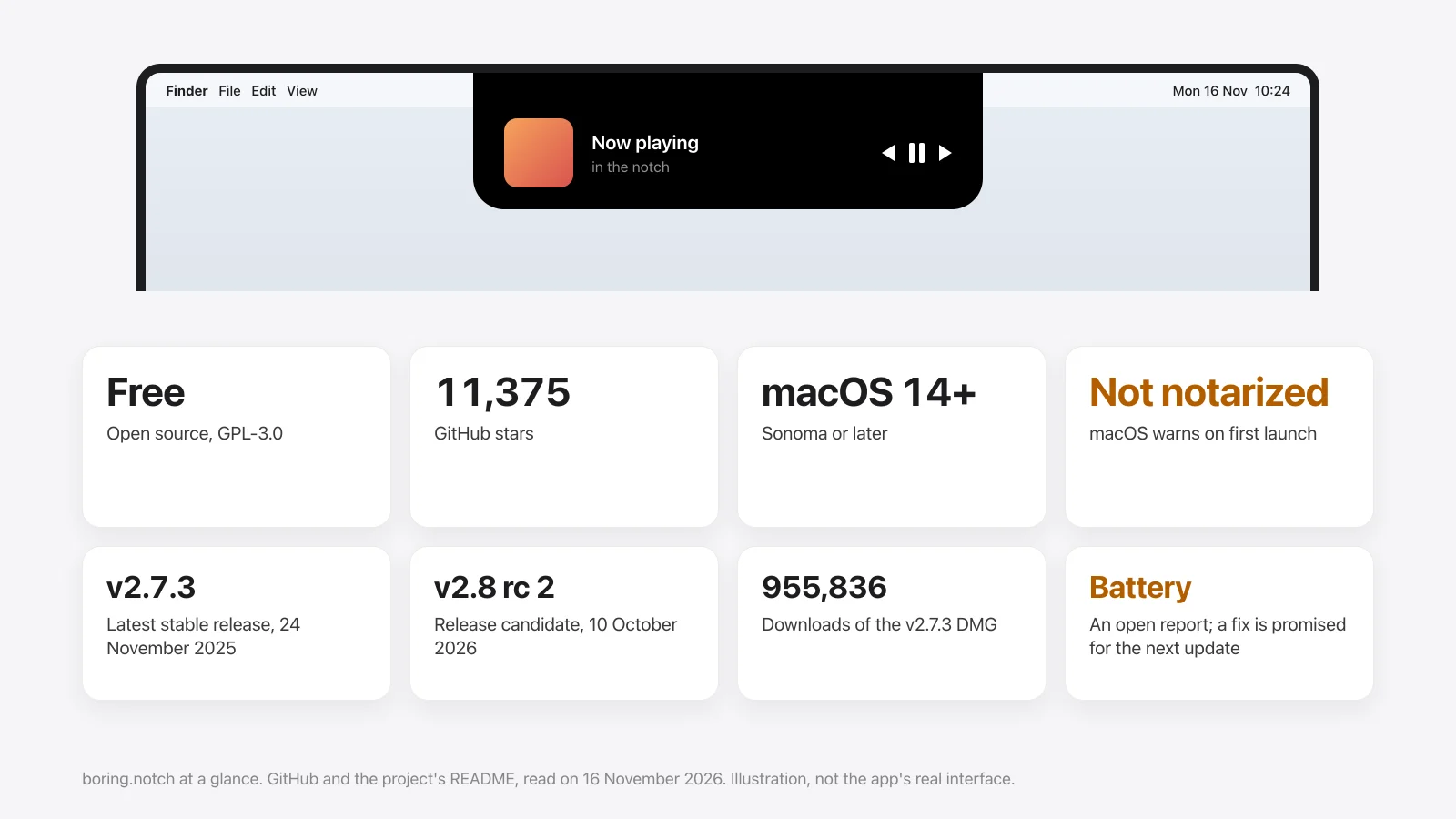
Boring Notch, written boring.notch, is the most popular free notch app for the Mac. It is open source and has 11,375 stars on GitHub. The questions people ask before installing it are the same few: is it safe, why does macOS warn about it, and does it use much battery. Here are the answers, from the project's own GitHub on 16 November 2026.
The short answer
- Is it safe: it is open source under GPL-3.0, so anyone can read the code. It is not notarized by Apple, which is why macOS warns on first launch.
- Battery: an open report describes high energy use on v2.7.3. A maintainer traced it to the music visualizer and says the fix is in the next update.
- Install:
brew install --cask TheBoredTeam/boring-notch/boring-notch, or the DMG from its GitHub releases. - Against other notch apps: see Halo vs boring.notch, free against $9.99.
What Boring Notch is
Boring Notch turns the MacBook notch into a small control area. According to its README, it does these today:
- Music: what's playing, with controls and a visualizer.
- Calendar and Reminders.
- A mirror that uses the camera.
- A charging indicator with the battery percentage.
- A file shelf with AirDrop.
- Replacements for the volume, brightness and keyboard backlight pop-ups.
- Gestures, and sizing for different displays.
Still on its roadmap, unchecked: Bluetooth device activity, weather, lock screen widgets, an extension system, and notifications, which are marked "under consideration".
| boring.notch | |
|---|---|
| Price | Free, donations welcome |
| License | GPL-3.0, source on GitHub |
| Needs | macOS 14 Sonoma or later |
| Latest stable release | v2.7.3, 24 November 2025 |
| Latest pre-release | v2.8 release candidate 2, 10 October 2026 |
| Activity | Last code push on 16 November 2026; 435 open issues |
Is Boring Notch safe?
Two facts decide this, and they point in different directions.
The code is public. Anyone can read it, 1,230 people have forked it, and the v2.7.3 installer has been downloaded 955,836 times from GitHub. A popular open-source app is hard to hide something in.
It isn't notarized. Notarization is Apple's automated check of an app before release. The README says why it's missing: "We don't have an Apple Developer account (yet)". So macOS can't confirm who made the app and says so on first launch.
That warning is about the missing check, not about something found in the app. I haven't audited the code, and I know of no report of malware in it. What matters most is where you download it: use the project's own GitHub page or its Homebrew tap, not a site that only shares the name.
For fairness: Halo isn't notarized yet either, and shows the same warning.
"Boring Notch can't be opened": the first-launch warning
If the app won't open after you install it from the DMG, this is almost always the reason. The README gives two ways past it:
- System Settings: try to open the app once, then go to System Settings › Privacy & Security, scroll to the bottom and click Open Anyway.
- Terminal: the project's own command, which removes the download flag from the app:
xattr -dr com.apple.quarantine "/Applications/Boring Notch.app"
Installing with Homebrew skips the warning, as the README notes.
Does Boring Notch drain the battery?
It can, on the current stable version, and the project knows.
- An issue opened in May 2026, "Battery drain" (#1260), reports a very high 12-hour power figure on an M4 MacBook Air with v2.7.3. Several other users confirm it there.
- A maintainer answers that with the notch closed it should use 0 to 1% of the processor on Apple silicon, even with music playing.
- The same maintainer later writes that the cause "is related to a bug in the music visualizer which has already been corrected for the next update".
- The issue is still open, and v2.8 is still a release candidate.
I haven't measured it myself. To check on your own Mac, open Activity Monitor › Energy and look at boringNotch's Energy Impact while music plays and while nothing does. If it's high while music plays, the visualizer is the first thing to look at in its settings.
How to install it
With Homebrew:
brew install --cask TheBoredTeam/boring-notch/boring-notchBy hand: download boringNotch.dmg from the Releases page of TheBoredTeam/boring.notch, drag the app to Applications, and follow the first-launch steps above.
What it doesn't do, and the alternatives
Boring Notch is a music and shelf app first. If that's what you want, it's the one to try, and it costs nothing. People look for something else when they want one of these:
- Notifications from any app in the notch. On the roadmap, not built.
- Dictation, or coding agents such as Claude Code. Not listed.
- External monitor brightness over DDC/CI. Not listed.
- Synced lyrics. Not listed.
Those are what Halo adds, for $9.99 once; the row-by-row version is in Halo vs boring.notch. Other free options are in eight free Dynamic Island apps for Mac, and the paid ones, Alcove and NotchNook included, are in the notch apps compared.
Where Boring Notch is the better pick: it's free, its code is open, it runs on macOS 14 while Halo needs macOS 15, and it has a keyboard backlight pop-up that Halo doesn't.
Sources
- GitHub, TheBoredTeam/boring.notch: stars, forks, license, open issues, last push, release dates and download counts from the GitHub API on 16 November 2026.
- The project's README on the same day: requirements, features and roadmap, the first-launch warning and both ways past it, and the Homebrew command.
- Issue #1260, "Battery drain", and the maintainers' replies in it.
- Not done: I did not install or measure Boring Notch for this page.
Questions
Is Boring Notch safe?
Its code is open source under GPL-3.0 and it is widely used, with 11,375 GitHub stars. It is not notarized by Apple, so macOS warns on first launch. Download it only from the project's GitHub page or its Homebrew tap.
Why does macOS say Boring Notch is from an unidentified developer?
Because the app isn't notarized. The project's README says it doesn't have an Apple Developer account yet. Open System Settings, Privacy & Security, and click Open Anyway, or install it with Homebrew.
Does Boring Notch drain battery?
Some users report high energy use on v2.7.3, in an issue opened in May 2026. A maintainer traced it to the music visualizer and says it is fixed for the next update, which was still a release candidate on 16 November 2026.
How do I install Boring Notch on a Mac?
Run brew install --cask TheBoredTeam/boring-notch/boring-notch in Terminal, or download boringNotch.dmg from the project's GitHub releases and drag the app to Applications.
Is Boring Notch free?
Yes. It is free and open source, and the project accepts donations.
Does Boring Notch show notifications?
Not yet. Notifications are on its roadmap, marked as under consideration.
What is a good Boring Notch alternative?
For free ones, DynamicNotch and Atoll are open source too. Among paid apps, Alcove, NotchNook and Halo add things Boring Notch doesn't list, such as notifications from any app.
More guides: Halo vs boring.notch · Free Dynamic Island apps for Mac · Best Mac notch apps compared · All guides
Try Halo
Notifications from any app, music with lyrics, dictation and your AI agents in the notch. $9.99 one-time, no subscription.
Buy Halo