The best notch apps for Claude Code, Codex and other coding agents
A coding agent works in a terminal you aren't looking at. A notch app puts its status at the top of the screen, so you see when it's done or waiting for you. Five apps do this today. Here is what each one covers, checked on their own sites on 12 November 2026.
The short answer
- Only agents, and many of them: Vibe Island. It follows the most agents and lets you approve requests from the notch.
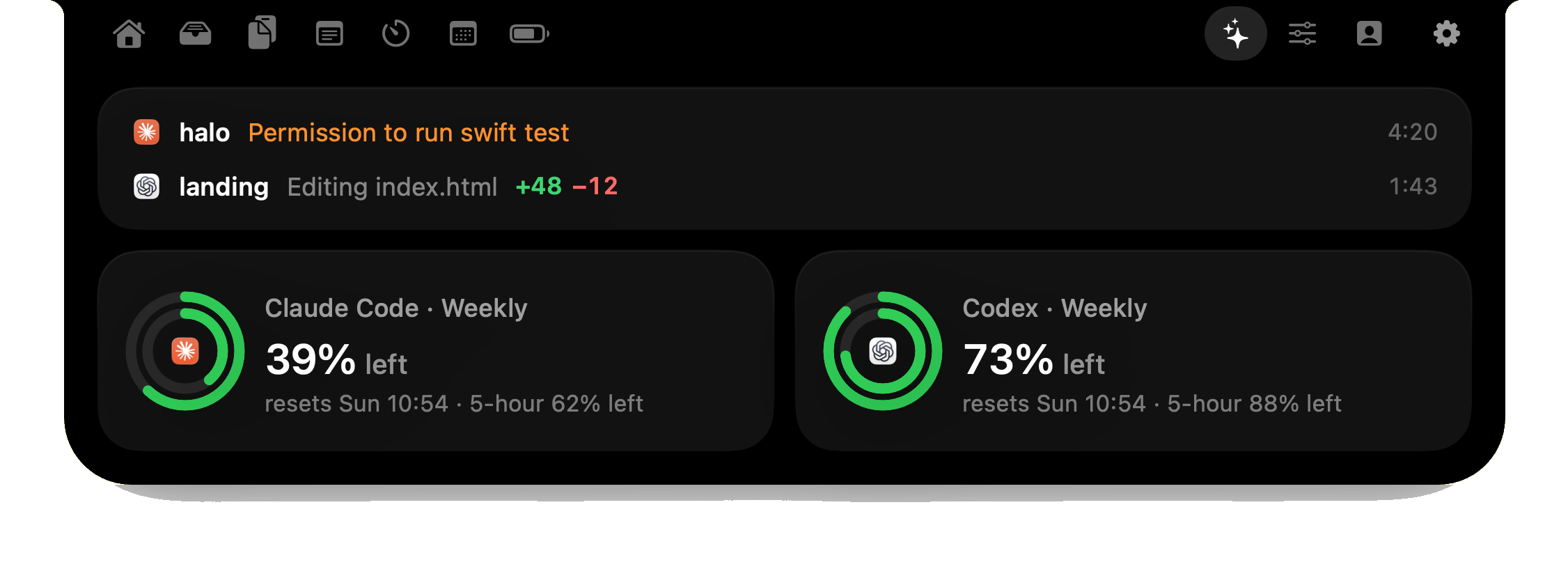
- Agents plus the rest of the notch: Halo, $9.99 once. Five agents, answers to their permission prompts, and music, notifications, dictation and monitor control in the same island.
- You want to try before paying: Droppy has a 3-day trial and Seam a 48-hour one.
What to compare
These apps look alike in screenshots. Three things separate them:
- Which agents: Claude Code is on every list. Codex, Cursor, Gemini CLI and OpenCode are not.
- Watch or answer: most apps show progress. Two let you answer a permission prompt from the notch, which is what saves the trip back to the terminal.
- What else the notch does: one app is only for agents. The others are general notch apps with an agents feature.
Side by side
| App | Agents it names | Answer prompts from the notch | Usage limits | Price |
|---|---|---|---|---|
| Vibe Island | Claude Code, Codex, Gemini CLI, Cursor, OpenCode, Droid, Kiro | Yes | Yes | $19.99 once, 1 Mac |
| Halo | Claude Code, Codex, OpenCode, Gemini CLI, Cursor | Yes: Claude Code, Codex, OpenCode | Yes | $9.99 once, 3 Macs |
| Droppy | Claude Code, Codex, Cursor, Antigravity, OpenCode | Not listed | Yes | $9.99 once, 2 Macs |
| Seam | Claude Code "and other agents" | Not listed | Yes | $19.90 once |
| Notchy | Usage for Claude Code, Cursor, Copilot and others | Not listed | Yes | $24.99 once, 1 Mac |
"Not listed" means the app's site doesn't mention it, not that I tested and it failed. Vibe Island's and Notchy's prices are from 10 November; the rest was read on 12 November 2026.
1. Vibe Island: best if agents are all you want in the notch
Verdict: the only app here built just for agents, and the one that names the most of them.
- Best for: people who run several agents at once and want the notch to be about nothing else.
- Strengths: seven agents named on its site, approving requests from the notch, usage and quota tracking, and a jump to the exact terminal tab.
- Trade-offs: no music, notifications or other notch features, so you may run a second notch app beside it.
- Price: $19.99 once for one Mac, with a year of updates.
Detail: Halo vs Vibe Island.
2. Halo: best if you want agents and a full notch app in one
Verdict: fewer agents than Vibe Island, but it answers their prompts too and does everything else a notch app does, for half the price.
- Best for: people who use Claude Code or Codex daily and also want music, notifications and dictation in the notch.
- Strengths: status for five agents with usage rings, Allow, Deny and Always from the notch for Claude Code, Codex and OpenCode, and hold-to-talk dictation for writing prompts.
- Trade-offs: it needs macOS 15 or later, has no free trial, and isn't notarized yet, so macOS asks you to confirm the first launch.
- Price: $9.99 once, on up to 3 Macs.
3. Droppy: best if you want a trial and a wide feature list
Verdict: a general notch app that shows agents step by step and their plan limits, at the same price as Halo.
- Best for: people who want to try before buying, or who are on macOS 14.
- Strengths: Claude Code, Codex, Cursor, Antigravity and OpenCode, a Usage view for plan limits, and a 3-day trial.
- Trade-offs: its site doesn't list answering permission prompts from the notch.
- Price: $9.99 once for two Macs.
Detail: Halo vs Droppy.
4. Seam: best if you also want a focus timer and voice typing
Verdict: agent progress and usage as one feature among many, with a short trial.
- Best for: people who mostly use Claude Code and want Pomodoro and on-device voice typing alongside it.
- Strengths: progress and usage for Claude Code, a 48-hour trial and a 14-day refund.
- Trade-offs: the site names Claude Code and "other agents" without saying which, and doesn't list answering prompts.
- Price: $19.90 once.
Detail: Halo vs Seam.
5. Notchy: best if you track spend across many AI tools
Verdict: strongest on usage tracking, lighter on live agent status.
- Best for: people who pay for several AI services and want the remaining quota of each in one place.
- Strengths: usage for Claude Code, Cursor, Copilot, DeepSeek and the OpenAI API, and it runs on macOS 13.
- Trade-offs: the highest price here, for one Mac, and no answering of prompts listed.
- Price: $24.99 once, plus tax.
Detail: Halo vs Notchy.
The free way
You don't need an app to know when an agent is done. Claude Code, Codex and Cursor can each play a sound or send a notification from a hook or a setting. The steps are in Claude Code, Codex and Cursor. A notch app adds what a sound can't: which session, what it's doing, and a way to answer.
Sources
- vibeisland.app, getdroppy.app and its llms.txt, notchy.dev and getseam.app and its llms.txt, read on 12 November 2026.
- Vibe Island's and Notchy's prices: their pricing pages, read on 10 November 2026.
- Halo's agent support as shipped in Halo 3.0.
Questions
What is the best notch app for Claude Code?
It depends on what else you want. Vibe Island is built only for agents and names the most of them. Halo shows five agents, lets you answer Claude Code's permission prompts from the notch and is also a full notch app, for $9.99 once. Droppy and Seam offer free trials.
Can I approve Claude Code permission prompts from the notch?
Yes, in two of the five apps compared here. Vibe Island and Halo both let you answer a request from the notch without going back to the terminal. Halo does it for Claude Code, Codex and OpenCode.
Which notch apps support Codex?
Vibe Island, Halo and Droppy name Codex on their sites. Seam names Claude Code and other agents without listing them. Notchy's home page lists usage tracking for Claude Code and Cursor; check its site for Codex.
Is there a free way to see when Claude Code is done?
Yes. A Stop hook in Claude Code's settings can play a sound or show a macOS notification when a turn ends. A notch app adds the session's name, what it is doing and a way to answer it.
Do these notch apps work on a Mac without a notch?
All five say they do: on an external monitor, iMac or Mac mini they draw a floating island at the top of the screen.
More guides: Answer Claude Code prompts without the terminal · Know when Claude Code is done · Best Mac notch apps compared · All guides
Try Halo
See Claude Code, Codex and Cursor in the notch and answer their prompts there. Plus notifications, music and dictation. $9.99 one-time, no subscription.
Buy Halo