Dynamic Island on Mac: which Macs have it, and how to get it on yours
On October 28, 2026 Apple announced the Dynamic Island for the Mac, the first time it leaves the iPhone. It ships on November 6, but only on the new 14-inch and 16-inch MacBook Pro. Here's what it does, which Macs have it, and how to get the same idea on the Mac you already own, from someone who makes one of those apps.
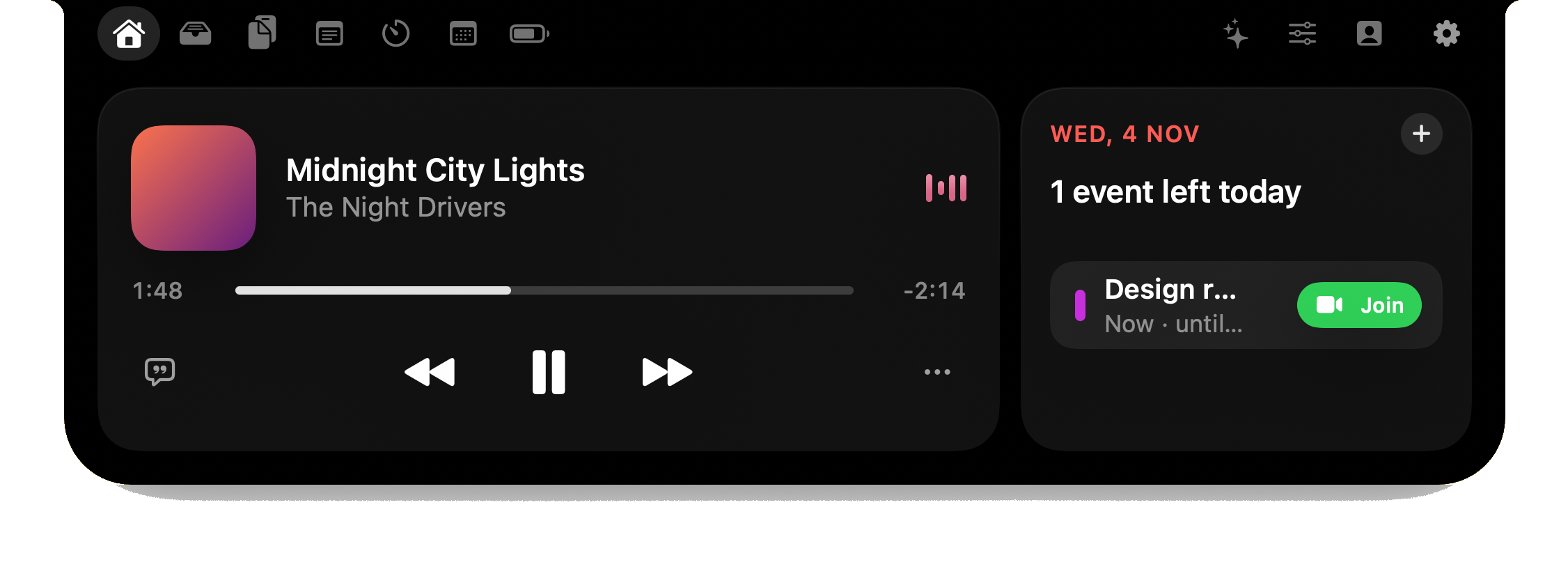
What Apple's Dynamic Island on the Mac does
Like the iPhone's, it's an interactive area around the camera at the top of the screen that grows to show what's going on while you work in other apps. Apple's list for the Mac:
- Live Activities that stay visible, such as music that's playing.
- Answer a phone call, control music and accept an AirDrop request from there.
- Spotlight and Siri live in it too.
- The new MacBook Pro has a touchscreen, so you can tap it, for example to pause a song.
It doesn't bring Face ID: the new MacBook Pro keeps Touch ID and has a 12-megapixel Center Stage camera.
Which Macs have it
| Mac | Apple's Dynamic Island |
|---|---|
| New 14-inch and 16-inch MacBook Pro (announced October 28, 2026; from $2,899 and $3,399 in the US) | Yes, from November 6 |
| Every other Mac: MacBook Air, earlier MacBook Pros with a notch, iMac, Mac mini, Mac Studio and Mac Pro | No |
Apple announced it for the new MacBook Pro's own display. The announcement says nothing about older Macs or external monitors.
How to get a Dynamic Island on any Mac
Notch apps have done this since the first MacBooks with a notch: they draw the island in software, around the notch, or at the top of a screen that has none. The main ones:
| App | Price | Macs without a notch |
|---|---|---|
| Halo | $9.99 once, 3 Macs | Yes |
| Droppy | $9.99 once, 2 Macs | Yes |
| Alcove | $13.99 | Not mentioned |
| DynamicLake | From $13.99 once | Yes |
| NotchNook | $25 once or $3/month | Yes |
| boring.notch | Free, open source | Not listed |
For the full comparison, including what 1,744 bug reports say goes wrong, see the best Mac notch apps.
What Halo does
Halo is the one I make. Music with lyrics, notifications from any app, calls and meetings with a Join button, timers, a file shelf, clipboard history and dictation, in the notch. On a Mac without a notch, an iMac or an external monitor, it draws the island at the top of the screen. Two things Apple's announcement doesn't cover:
- Your coding agents. When Claude Code, Codex or OpenCode needs permission or asks a question, you answer from the island: Allow, Deny or Always, pick an answer, approve a plan. How that works.
- External monitors. The brightness keys change a monitor's real backlight over DDC/CI, and the island can sit on every display.
It's $9.99 once, no subscription.
Buying the new MacBook Pro?
Then you'll have Apple's island for calls, music, AirDrop and Siri. A notch app is worth it on that Mac only for what Apple's doesn't do, such as answering coding agents or controlling a monitor. I haven't had the new MacBook Pro in my hands yet, so I can't tell you how an app's island and Apple's share the space. I'll update this page when it ships.
Questions
Which Macs have the Dynamic Island?
Only the new 14-inch and 16-inch MacBook Pro that Apple announced on October 28, 2026, available from November 6. No other Mac has it.
How much is the MacBook Pro with the Dynamic Island?
In the US it starts at $2,899 for the 14-inch model and $3,399 for the 16-inch model.
Can I get the Dynamic Island on a MacBook Air or an older MacBook Pro?
Not Apple's, but notch apps draw one in software: Halo, Droppy, Alcove, DynamicLake, NotchNook, or the free boring.notch. Halo also works on Macs and monitors without a notch.
Is there a free Dynamic Island app for Mac?
Yes: boring.notch is free and open source, and good for music and a file shelf. Halo is $9.99 once and adds notifications, dictation, coding agents and monitor control.
Does the Mac's Dynamic Island have Face ID?
No. The new MacBook Pro keeps Touch ID; its camera is a 12-megapixel Center Stage camera.
More guides: Best Mac notch apps · A Dynamic Island on an external monitor · All guides
Try Halo
A Dynamic Island on the Mac you already have: music, notifications, coding agents and more. $9.99 one-time, no subscription.
Buy Halo