macOS 27.3 brings Live Activities to the menu bar. Do you still need a notch app?
Apple's Dynamic Island is only on the new 14- and 16-inch MacBook Pro. With macOS 27.3, every other Apple silicon Mac gets part of it: Live Activities in the menu bar. Here's what that covers, what it leaves out, and when a notch app is still worth having. I make one of those apps, Halo, so weigh the last part with that in mind.
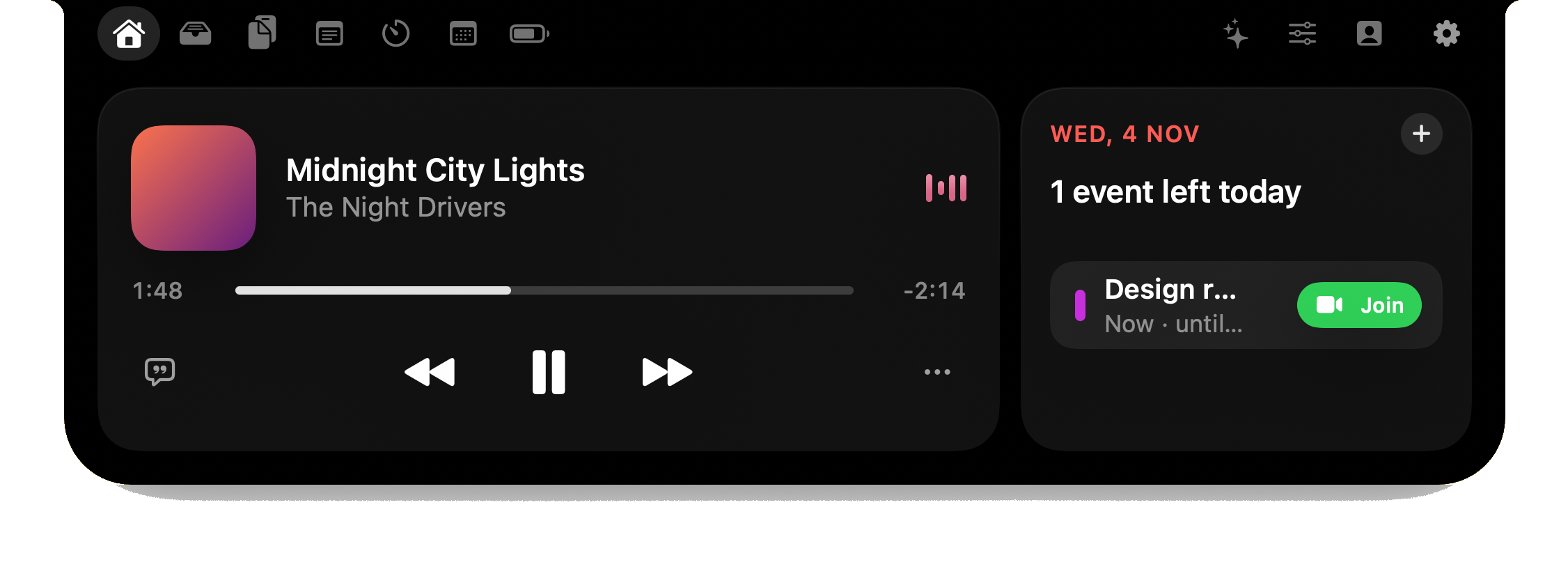
What macOS 27.3 adds
According to MacRumors' report of 4 November 2026, the first macOS 27.3 developer beta turns on Live Activities in the menu bar on Apple silicon Macs that don't have the Dynamic Island:
- Apple's own apps first: Apple Music, Clock and Voice Memos, plus screen recording.
- Other apps can join: third-party Mac apps can add Live Activities support.
- Release: the update is expected in December 2026. Until then it's a developer beta, and details can change.
This builds on macOS 26, which already showed Live Activities mirrored from an iPhone. Apple describes the idea as getting "timely updates at a glance", such as pausing a song or accepting an AirDrop request.
Which Macs get what
| Dynamic Island | Live Activities in the menu bar | |
|---|---|---|
| New 14- and 16-inch MacBook Pro (OLED) | Yes, built in | In the Dynamic Island |
| Other Apple silicon Macs | No | Yes, with macOS 27.3 |
| Intel Macs | No | Not in the report, which names Apple silicon Macs |
More on the hardware side in Dynamic Island on Mac: which Macs have it.
What it doesn't change
Live Activities show what an app chooses to publish, in the menu bar. From what Apple has shown so far, that's a short list of apps and the ones that add support later. It is a different thing from an island that reads what's happening across your Mac. These are the jobs a notch app does that the report doesn't mention for 27.3:
- Any app's notifications in the notch. A Live Activity exists only if the app makes one. Showing every banner in the notch is something an app like Halo does by reading notifications on your Mac.
- Coding agents. Claude Code, Codex and OpenCode run in a terminal and don't publish Live Activities. Seeing their status and answering their permission prompts from the notch needs an app that reads their hooks and session files.
- Dictation. Holding a key to talk into any app isn't a Live Activity at all.
- External monitors. The menu bar is on every screen, but brightness keys that work on a monitor over DDC/CI are a separate feature.
- Music from any player, with lyrics. Apple Music is on Apple's list. A browser tab or another player depends on that app adding support.
- The notch itself. On a MacBook with a notch, menu bar space is already tight; icons hide behind the notch when they don't fit. A notch app uses the space the menu bar can't.
So, do you still need a notch app?
- You don't if all you wanted was to see the playing song or a running timer from Apple's apps. Wait for macOS 27.3 and use what's built in. It's free.
- You might if you use Spotify or a browser for music, want notifications where you're looking, or want one place for timers, calendar, files and clipboard.
- You do if you run coding agents, dictate, or use an external monitor and want its brightness under your keys.
- On an Intel Mac or macOS 15 or 26, a notch app is the only way to get any of this today.
If you want one, start with the free ones: boring.notch covers music and a file shelf (Halo vs boring.notch, free against $9.99). The paid ones are compared here. Halo is $9.99 once and runs on macOS 15 or later, on Apple silicon and Intel, with or without a notch.
What I'll update here
This page is written from the developer beta report, not from a shipping release. When macOS 27.3 is out I'll run it next to Halo on the same Mac and replace the list above with what I see, including whether Halo should hand anything over to Apple's version.
Questions
What is new in macOS 27.3?
Live Activities in the menu bar on Apple silicon Macs without the Dynamic Island, for apps such as Apple Music, Clock and Voice Memos and for screen recording. It was in the first developer beta in early November 2026 and is expected in December.
Does macOS 27.3 add a Dynamic Island to my Mac?
No. The Dynamic Island is hardware on the new 14- and 16-inch MacBook Pro. macOS 27.3 shows Live Activities in the menu bar on other Apple silicon Macs.
Will third-party apps show Live Activities on the Mac?
They can: third-party Mac apps can add Live Activities support. Each app has to do it, so it depends on the apps you use.
Do notch apps still make sense after macOS 27.3?
For music from Apple's apps and timers, the built-in version may be enough. Notch apps still cover what Live Activities don't: notifications from any app, coding agent status and answers, dictation, external monitor control and Macs on older macOS or Intel.
Does Halo work with macOS 27.3?
Halo runs on macOS 15 or later. I'll test it on the 27.3 release and note anything that changes here and in the changelog.
More guides: Dynamic Island on Mac · Best Mac notch apps in 2026 · Free Dynamic Island apps for Mac · All guides
Try Halo
What the menu bar doesn't do: notifications, coding agents, dictation and monitor control, in your Mac's notch. $9.99 one-time, no subscription.
Buy Halo