Vibe Island for Mac: what it is, what it costs, and whether it's safe
Vibe Island is a Mac app that shows your AI coding agents in the MacBook notch. It is the best-known app of its kind, and people ask the same few things before trying it: what it does, what it costs, whether the trial is really free, and whether it is safe. Here are the answers, from Vibe Island's own site on 19 November 2026.
The short answer
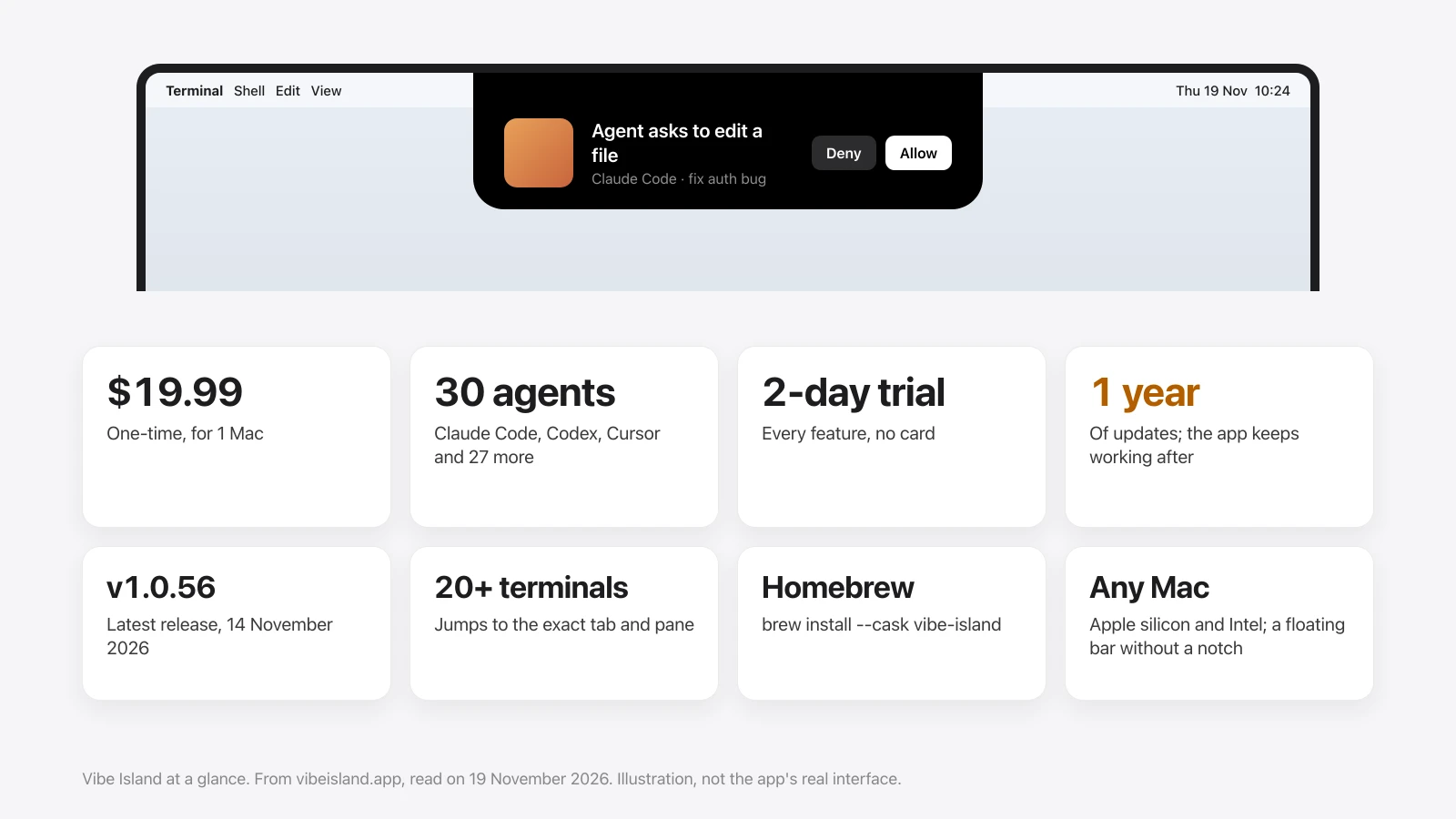
- What it is: a notch panel for AI coding agents. It shows what Claude Code, Codex, Cursor and 27 others are doing, and lets you allow, deny and answer from the notch.
- Price: $19.99 once for 1 Mac, $29.99 for 2, $39.99 for 3, each with a year of updates. No subscription.
- Free trial: 2 days with every feature and no card. After that it keeps running in a limited Free Mode.
- Is it safe: its site says everything stays on your Mac, with no cloud, account or telemetry. That is the developer's statement; I have not audited the app.
- Against other notch apps: see Halo vs Vibe Island and five notch apps for Claude Code, compared.
What Vibe Island is
Vibe Island turns the MacBook notch into a status panel for coding agents that run in a terminal or an editor. Its own description: "It is not an AI agent itself; it works with the ones you already use." According to its site, it does these today:
- Shows every running session in one list, with what each agent is doing.
- Shows a permission request in the notch with Allow and Deny buttons, so you don't switch to the terminal.
- Shows an agent's question with its options, and lets you pick one.
- Renders a plan in Markdown so you can read it before you approve it.
- Takes you to the exact terminal tab and split pane of a session when you click it.
- Shows how much of your Claude, Codex, Kimi, GLM and DeepSeek quota is left.
- Monitors agents that run on remote servers over SSH.
- Plays 8-bit sounds for events, with sound packs you can import.
- Forwards approvals, questions and finished tasks to an iPhone through the Bark app.
| Vibe Island | |
|---|---|
| Price | $19.99 one-time for 1 Mac; $29.99 for 2; $39.99 for 3 |
| Updates | 1 year included; the app keeps working after that |
| Free trial | 2 days, every feature, no card; then Free Mode |
| Agents | 30, set up automatically on first launch |
| Terminals and editors | More than 20, including iTerm2, Ghostty, Warp, Terminal, WezTerm, Kitty, VS Code and Cursor |
| Runs on | Apple silicon and Intel; a floating bar on screens without a notch |
| Latest release | v1.0.56, 14 November 2026 |
What Vibe Island costs
It is a one-time purchase with no subscription. A license for one Mac is $19.99. Extra Macs are $10 each, so two Macs are $29.99 and three are $39.99.
Each license includes one year of updates. The site is clear about what happens next: "Your app keeps working forever with every feature you have — nothing is taken away." Renewing is optional and only buys another year of new versions.
A license moves with you to a new Mac. The limit is how many Macs run it at the same time: one for a 1-Mac license, two for a 2-Mac license.
Is Vibe Island free?
Partly. Every feature is free for 2 days, and you don't enter a card. After the trial the app doesn't stop. It drops to what its site calls Free Mode:
- Still works: your current session, its notifications, and your usage.
- Needs a license: more than one session, approving permissions, answering questions, jumping to the terminal, and action shortcuts.
So the free version watches one agent. The parts most people install it for, answering from the notch and several sessions at once, are paid.
Which agents and terminals it supports
This is where Vibe Island is ahead of every other notch app I've checked. Its site lists 30 agents: Claude Code, Codex, ZCode, Gemini CLI, Antigravity CLI, Cursor, Trae, OpenCode, MiMoCode, Droid, Devin, Qoder, QoderWork, Qwen, QwenWork, Grok Build, Kimi Code, DeepSeek, DeepSeek Harness, Mistral Vibe, Copilot, CodeBuddy, WorkBuddy, Kiro, Hermes, Amp, Pi Agent, Oh My Pi, Gajae Code and Kimi.
Setup is automatic. On first launch it configures each supported tool on your Mac, with "no API keys, no cloud accounts, no manual editing". That means it writes to your agents' own settings, which is worth knowing if you keep those files in version control.
It lists more than 20 terminals and editors, among them iTerm2, Ghostty, Warp, Terminal, WezTerm, Kitty, Zellij, VS Code and Cursor, and says a click lands on the exact tab and split pane.
Is Vibe Island safe?
Here is what its site states, and what I can and can't confirm.
What it says about your data. "Everything stays on your Mac. No cloud, no accounts, no telemetry." Its FAQ adds that session content, tool names and terminal metadata never leave the machine.
What I can't confirm. I haven't audited the app or watched its network traffic, so those are the developer's statements, not my findings. Its site doesn't say whether the app is notarized by Apple, and I didn't test a download.
What lowers the risk. It is updated often (v1.0.56 on 14 November 2026), it can be installed with Homebrew, and the 2-day trial needs no card, so you can look at it before paying. Download it from vibeisland.app or Homebrew, not from a mirror site that only shares the name.
One thing to weigh yourself: an app that approves agent permissions sits between you and tools that can run commands. That is true of every app in this category, Halo included.
How to install Vibe Island
Two ways, both from its site:
- Download: the "Download for Free" button on vibeisland.app starts the 2-day trial.
- Homebrew:
brew install --cask vibe-island, andbrew upgradefor updates.
On a Mac with a notch the panel sits in the notch. On an external display or a Mac without a notch, it appears as "a compact floating bar at the top center of the screen".
What Vibe Island doesn't do
It is built for agents only. When I compared it on 10 November 2026, its site listed none of the general notch features: no Now Playing or lyrics, no banners for Messages, Slack or Mail, no dictation, no file shelf, no clipboard history and no control of an external monitor's brightness. If something there has changed, tell me and I'll fix this page.
That is a choice, not a fault. If agents are all you want in the notch, it goes deeper than anything else.
Vibe Island alternatives
Other apps put coding agents in the notch, with different trade-offs. Five of them are compared here, on which agents they cover, whether you can answer from the notch, and price.
Halo, the app I make, is the opposite trade. It covers fewer agents: status for Claude Code, Codex, OpenCode, Gemini CLI and Cursor, and answering prompts for Claude Code, Codex and OpenCode. Around them it adds the rest of a Dynamic Island: music with lyrics, notifications from any app, dictation, timers, a file shelf and external monitor brightness. It is $9.99 once for up to 3 Macs, with no trial. The full comparison is in Halo vs Vibe Island.
Pick Vibe Island if you run agents Halo doesn't cover, want to land on the exact terminal pane, or watch agents on remote servers. Pick Halo if your agents are on that shorter list and you want one island for everything else too.
Sources
- vibeisland.app: features, pricing, the agent list and the FAQ, read on 19 November 2026.
- Vibe Island's changelog: v1.0.56, 14 November 2026.
- Vibe Island's docs: iPhone notifications through Bark.
Questions
What is Vibe Island?
Vibe Island is a Mac app that turns the MacBook notch into a status panel for AI coding agents. It shows what Claude Code, Codex, Cursor and 27 other agents are doing, lets you allow or deny permission requests and answer questions from the notch, and takes you back to the right terminal tab. It is not an AI agent itself.
How much does Vibe Island cost?
$19.99 one-time for 1 Mac, $29.99 for 2 Macs and $39.99 for 3, as listed on its site on 19 November 2026. Each license includes one year of updates, and the app keeps working after that year.
Is Vibe Island free?
It has a 2-day trial with every feature and no card. After the trial it keeps running in Free Mode, which shows your current session, its notifications and your usage. Multiple sessions, approving permissions, answering questions and terminal jump need a license.
Is Vibe Island safe?
Its site says everything stays on your Mac, with no cloud, accounts or telemetry. That is the developer's statement; this page's author has not audited the app. Download it from vibeisland.app or Homebrew rather than a mirror site.
Which agents does Vibe Island support?
Its site lists 30, including Claude Code, Codex, Gemini CLI, Cursor, OpenCode, Copilot, Devin, Amp, Kiro, Droid and Qwen. It configures each one automatically on first launch.
Does Vibe Island work without a notch?
Yes. On an external display or a Mac without a notch it appears as a compact floating bar at the top centre of the screen.
Is there a cheaper Vibe Island alternative?
Halo is $9.99 one-time for up to 3 Macs. It covers fewer agents (Claude Code, Codex, OpenCode, Gemini CLI and Cursor) and adds music, notifications, dictation and external monitor control. Free open-source options exist too; see the comparison of notch apps for Claude Code.
More guides: Halo vs Vibe Island · Best notch apps for Claude Code · Answer Claude Code from the notch · boring.notch for Mac · All guides
Try Halo
Your coding agents in the notch, next to music, notifications and dictation. $9.99 one-time, no subscription.
Buy Halo